
Big news! 🎉 We’ve just released the beta version of WooCommerce Builder for Divi — built especially for the brand-new Divi 5 (Alpha).
If you’ve been itching to try our plugin with Divi 5, now’s your chance.
But… there are a few important things you need to know before you dive in.
⚠️ Read This Before Installing
This is a beta release. That means:
- It’s for testing purposes only
- All modules are ready for Divi 5.
- Use it only on fresh websites running Divi 5 Alpha
- Do NOT use it on live/production websites
- Tested up to Divi 5.0.0-public-alpha.21
This version is here so we can collect feedback, squash bugs, and make it even better before the official launch.
📌 About Divi 4 Compatibility
Right now, this beta does not support Divi 4 modules.
So if your site uses Divi 4 layouts that rely on Divi 4 modules, they won’t work with this version. Use it to build new websites only.
You can’t convert your Divi 4 websites to use this plugin yet, if you upload this version on a Divi 4 website, your layouts will not work.
Why?
The Divi 5 Migrator tool doesn’t fully support 3rd party modules yet. So, for now, we’re shipping only Divi 5–compatible modules to make sure things run smoothly.
The good news?
Future beta updates will include Divi 4 modules for:
- Backward compatibility
- Full support for the Divi 5 Migrator tool (once Elegant Themes fixes it for 3rd party modules)
📥 How to Download the Beta
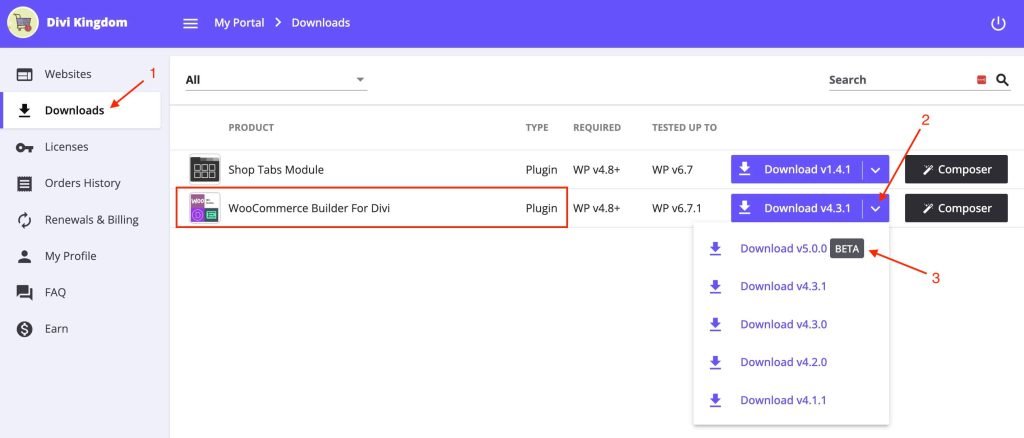
- Log into your account → Account Page
- Go to the Downloads tab
- Find WooCommerce Builder For Divi
- Click the download arrow (next to the button)
- Select 5.0.0 beta (first in the list)
Once downloaded, upload it to your test site like any other plugin and activate it with your license key.
This is a one time process, after that, you will get automatic updates right in your WordPress admin area.
💡 Using Your License on Dev/Staging Sites
Worried your one-site license won’t work for testing? No problem.
All licenses can be used on dev/staging domains without counting toward your activation limit.
Supported dev/staging TLDs:
*.dev, *.test, *.local, *.staging, *.example, *.invalid
*.myftpupload.com (GoDaddy), *.cloudwaysapps.com (Cloudways), *.ngrok.io
Supported dev/staging subdomains:
local.*, dev.*, test.*, stage.*, staging.*, stagingN.* (SiteGround)
*.staging.wpengine.com, dev-*.pantheonsite.io, test-*.pantheonsite.io
staging-*.kinsta.com
And yes, localhost works too.
Full dev/staging license rules here →
🎁 Bonus: Free Theme Builder Starter Pack
To make your testing super easy, I’m also giving you a free Theme Builder package.
With it, you can start experimenting right away without building layouts from scratch.
What’s inside the pack:
- Global Header
- Global Footer
- Home Page
- Shop Page
- Product Categories & Tags
- Single Product Pages
- Cart Page
- Checkout Page & Order Received (in one template)
- My Account & Login/Register (in one template)
How to use it:
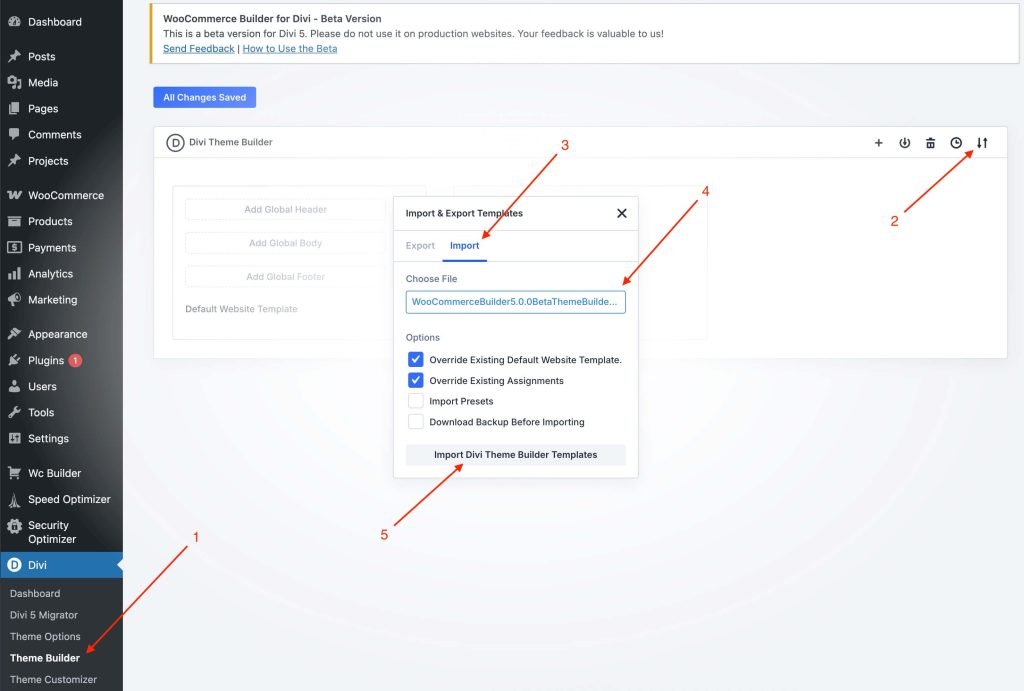
- Download the Theme Builder package here
- Install and activate WooCommerce Builder for Divi beta
- Go to Divi → Theme Builder in your WordPress dashboard
- Click Import, select the file you downloaded, and boom — your test store layouts are ready
This way, you can jump straight into testing the new modules without spending hours designing first.
📝 How to Share Your Feedback
We want your thoughts! If you run into bugs, have suggestions, or just want to tell us what you love…
Send your feedback here: Contact Page
Your input will help us make the WooCommerce Builder for Divi rock-solid for the Divi 5 era.
💬 Over to you: Will you be one of the first to test our WooCommerce Builder for Divi on Divi 5?
Discussion
Join the conversation